
HAProxy
k10y can monitor and manage HAProxy load balancers next to your Kubernetes clusters:
- See every frontend, backend and server, with live health, sessions, request rates and errors.
- Control servers instantly: drain one before a deploy, put it in maintenance, bring it back. No reload needed.
- Configure frontends, backends and servers from forms, or edit the raw
haproxy.cfg. Every change shows a diff, is validated by HAProxy, and only then applies. - Topology: a live diagram from frontend → backend → servers.
- Live charts, logs, certificates, stick tables, config history with rollback, alerts, rolling deploys, groups and a Kubernetes link that keeps a backend in sync with a Service.
Requirements
k10y talks to HAProxy through the official HAProxy Data Plane API v3. It's included in the haproxytech/haproxy-* images and in HAProxy Enterprise. The hub needs network access to the API's port (5555 by default). Protect that port: allow only the hub, and use HTTPS if it crosses an untrusted network.
Connect an HAProxy
You need the clusters.manage permission. Open HAProxy → Add HAProxy and enter:
- Name: how it appears in k10y, e.g.
edge-lb-1. - Data Plane API URL: e.g.
http://10.0.0.20:5555. - Username and password of a Data Plane API user.
- Verify TLS: for
https://URLs with a certificate the hub trusts.
Click Test connection. You'll see the API version and how many frontends, backends and servers it found. The password is stored encrypted in the hub's database.
Pages
Pick HAProxy in the system switcher, then the instance in the second switcher.
| Page | What you see |
|---|---|
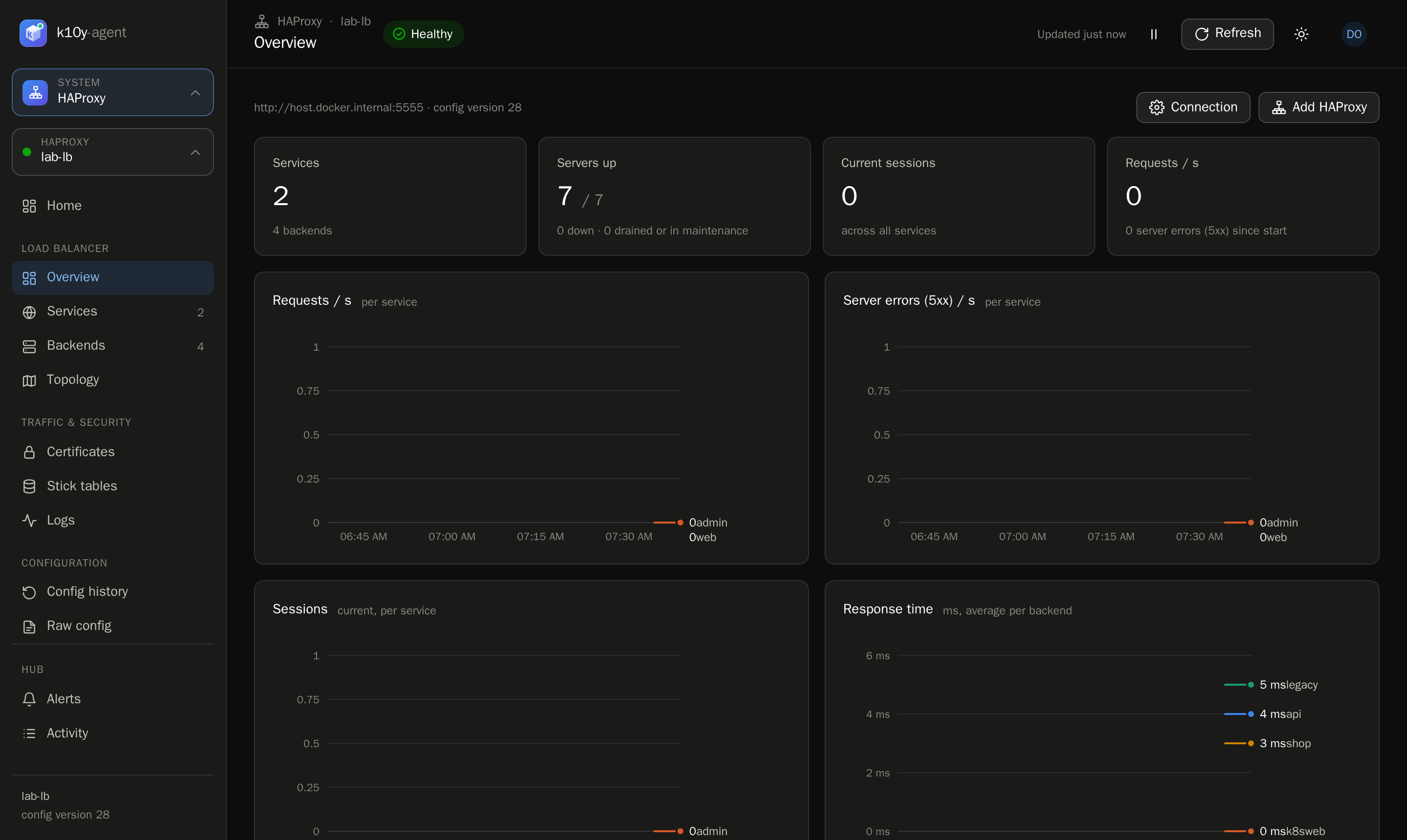
| Overview | A dashboard you can arrange: an overall status line, key numbers (requests/s, error rate, response time, sessions, servers up) with trends, problems (only when there are some), each frontend drawn as its routing (proxy, or path routing to several backends) with live health, one traffic chart (pick the metric, compare by frontend or backend, 15 minutes to 7 days, show only some) and an optional topology. Customize chooses the sections; it's saved to your account |
| Frontends | Number tiles for what's shown (frontends, requests/s, error rate, sessions, healthy backends). Filter by type (Proxy, Path routing, Other rules), problems, TLS, rate limit or IP allow-list; search by name, port, path or backend; sort by traffic or errors. Cards draw each frontend as its routing (path → backend with live server health); Table gives one row each, expandable to its routes |
| Backends | Number tiles for what's shown (servers up, new sessions/s, error rate, response time), then one table, a row per backend: health (x/y up), balancing, health check, which frontends use it, sessions, new/s, 5xx, response time. Click a row to see its servers: state, address, weight and share of traffic, health-check result, sessions, requests, 5xx, time in state. Search, filter (Problems, From Kubernetes, used by a frontend) and sort; backends with problems open by themselves |
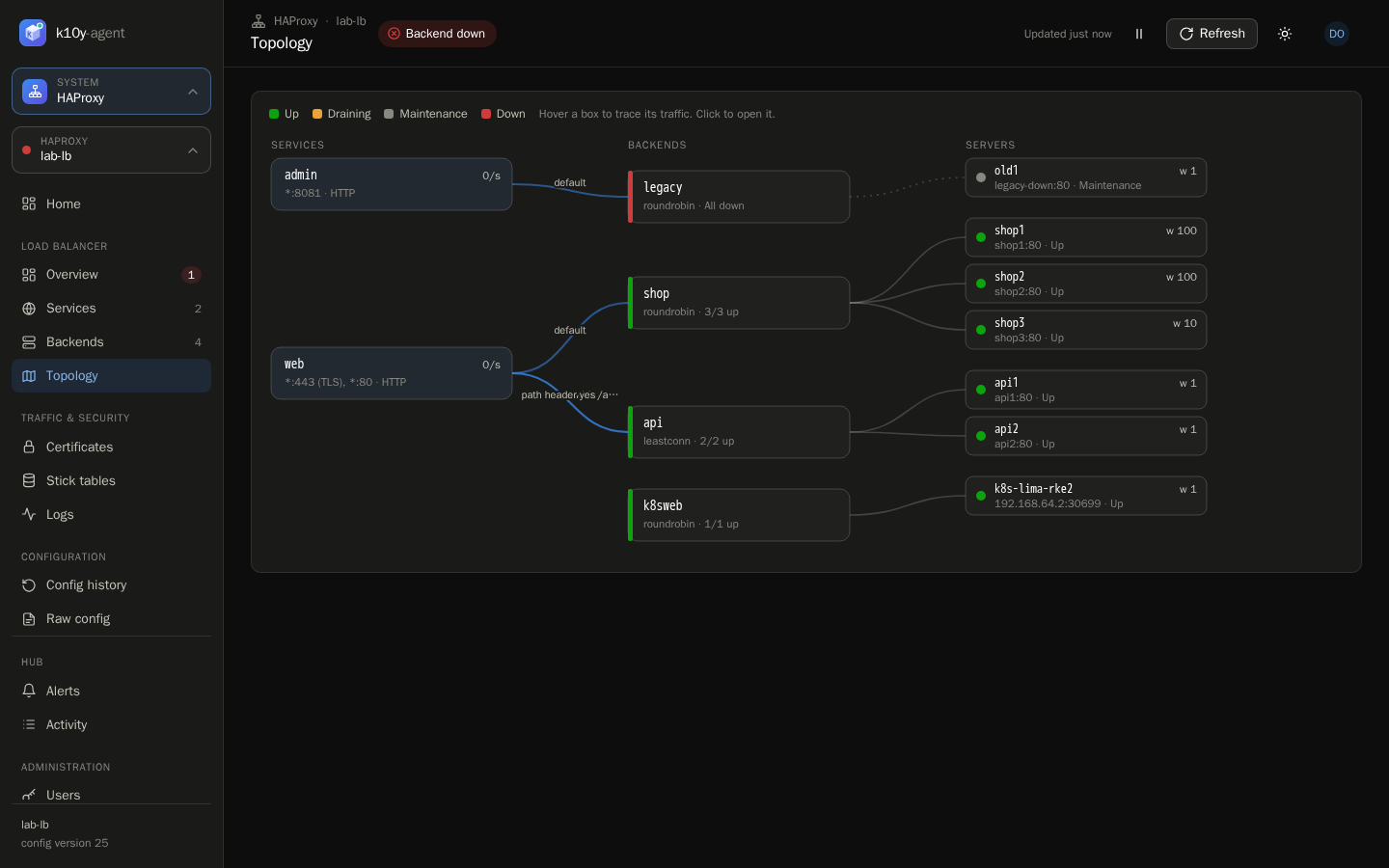
| Topology | Frontends → backends → servers with live traffic: thicker lines carry more requests per second, a moving line has traffic right now, orange or red lines return errors. Labels show the route and its rate; colours show server health. Hover to trace a path, click to open it. |
| Certificates | TLS certificates on the HAProxy: expiry, domains, which frontends use them; upload, replace, delete |
| Rate limits & blocks | Blocked IPs (refused on every frontend, changed live without a reload) and the live stick tables, e.g. the client IPs a rate limit is tracking, with Unblock to let one in again |
| Logs | Live request logs: status, request, frontend → server, duration, bytes, client; filter by text or status class; Block a client from its log line |
| Config history | Every configuration version, who changed it, the diff, and Restore |
| Raw config | The full haproxy.cfg, editable |
The page refreshes every 5 seconds. Use Pause to stop it while you read.
Drain, maintenance and back in service
From a server's ⋯ menu (permission haproxy.operate):
| Action | Effect |
|---|---|
| Drain | No new connections; existing sessions finish. Use it before deploying to that server. |
| Maintenance | Out of rotation now, and health checks stop. |
| Put back in service | Takes traffic again once its health check passes. |
These apply instantly through HAProxy's runtime API, without a reload, and each one is audited.
Keep drain and maintenance across reloads
Runtime states live in the running HAProxy process. When the configuration changes, HAProxy reloads, and without a server-state file a drained server goes back into rotation. k10y shows a warning on the Backends tab when an instance isn't set up for this.
To keep states across reloads:
global
    server-state-file /var/run/haproxy/server-state

defaults
    load-server-state-from-file global
Then save the state just before each reload. With the Data Plane API, do it in the reload command, for example:
#!/bin/sh
# reload_cmd for the Data Plane API: save server states, then reload through the master CLI
echo "@1 show servers state" | nc -w 3 127.0.0.1 9999 > /var/run/haproxy/server-state
echo reload | nc -w 5 127.0.0.1 9999 | grep -q '^Success=1'
(HAProxy started with -S 127.0.0.1:9999 for the master CLI. Adjust the address and paths to your setup.)
Add, edit and remove
You need the haproxy.configure permission.
- Frontends: New frontend opens a guided setup (below), or ⋯ → Edit frontend / Delete frontend. Set the protocol (HTTP or TCP), listen addresses (
*:80,10.0.0.5:443…), a default backend, routes, access policies and the client timeout. - Routes: + Add route on a frontend adds a path and its backend in one change: either a new backend with its servers, or an existing one. The route is placed before shorter paths that would also match it, so
/api/paymentsisn't caught by/api. - Backends: New backend (start from a type: web app, API, WebSocket, PostgreSQL, MySQL, Redis, MongoDB, other TCP), or ⋯ → Edit / Delete / Add server. A backend still used by a frontend can't be deleted.
- Servers: ⋯ → Edit / Remove server. Set address, port, weight (0–256), health check, backup, max connections and TLS to the server.
- Copy to another HAProxy: ⋯ → Copy to another HAProxy on a frontend (optionally with its backends) or a backend (with its servers). Things that already exist there are skipped, and the change is reviewed and validated on that HAProxy.
New frontend: start from what you're setting up
New frontend asks what you're setting up, fills in the right protocol, balancing, health check and timeouts, and shows realistic example values in grey (an empty field uses its example). One reviewed change creates the frontend and every backend with its servers.
| Setup | Protocol | What you fill in | Starts with |
|---|---|---|---|
| Microservice gateway | HTTP | A port, then rows of path → backend → servers → health check path, plus an optional default backend for everything else | /api/users → users (10.0.1.11:8080, 10.0.1.12:8080), /api/orders → orders, rest → web; round robin, GET /health, X-Forwarded-For |
| Website or web app | HTTP | A port (or HTTPS on 443 with a certificate and a redirect from 80), the app servers | round robin, GET /healthz |
| REST / JSON API | HTTP | Port and servers | least connections, GET /health, 60 s server timeout |
| WebSocket / real-time | HTTP | Port and servers | least connections, 1 h tunnel and client timeouts |
| PostgreSQL | TCP 5432 | Port and servers (the replica is marked backup) | first available, PostgreSQL login check as haproxy_check, 30 min timeouts |
| MySQL / MariaDB | TCP 3306 | Port and servers | first available, MySQL login check |
| Redis | TCP 6379 | Port and servers | first available, Redis PING check |
| MongoDB | TCP 27017 | Port and servers | least connections, TCP connect check |
| Other TCP service | TCP | Port and servers | least connections, TCP connect check |
Longer paths are always checked first. Start from a blank form instead opens the full frontend form.
How k10y writes the config
k10y follows the usual hand-written style, so its changes read like yours:
frontend microservices
    bind 0.0.0.0:443 ssl crt /etc/haproxy/new-tls.pem
    timeout client 60s
    http-request set-header X-Forwarded-Port %[dst_port]
    http-request redirect scheme https unless { ssl_fc }
    use_backend inbound-order if { path /order } || { path_beg /order/ }

backend inbound-order
    mode http
    balance roundrobin
    option redispatch
    retries 3
    timeout connect 10s
    timeout server 60s
server server1 172.2.2.1:32133 check inter 1s rise 3 fall 1- Routes are written inline. Path and under (
/order) becomes{ path /order } || { path_beg /order/ }: it matches/orderand/order/123but not/orders. Routes that already use a namedaclkeep it, anduse_backend xwith no condition is shown as "all traffic". - New servers get the same
check inter … rise … fall …as the backend's other servers, and names likeserver1,s-01orrabbitmq-server-01. - Only what changed is written: adding a route adds one
use_backendline; changing a timeout changes that line. Bind lines, servers and rules you didn't touch stay exactly as written. - One limit: when a section's own settings change (timeouts, options, stick-table), the Data Plane API rewrites those lines in its format (
300s→5m) and drops comments at the end of them.
Backend settings
| Setting | Choices |
|---|---|
| Balancing | Round robin · Least connections · Random (power of two) · First available · Client IP (sticky) · Static round robin · URL path · URL parameter (user_id) · HTTP header (X-Tenant-Id) · Custom expression (req.cook(session_id)) · RDP cookie. Each choice explains when to use it. |
| Health check | HTTP request (method, path, optional Host header) · TCP connect · PostgreSQL login · MySQL/MariaDB login · Redis PING · TLS handshake · SMTP greeting · LDAP bind |
| Sticky sessions | A SERVERID cookie keeps each user on the same server (HTTP) |
| Pass the client IP | Adds X-Forwarded-For (HTTP) |
| Timeouts | Connect, server reply and WebSocket/tunnel, in seconds. Typical: 30–60 s for APIs, 1800–3600 s for databases and WebSocket |
| Retry on another server | option redispatch with retries N (3 is usual) |
| Check timing | check inter 1s rise 3 fall 1: how often, how many OK checks to come up, how many failures to go down. Applied to every server of the backend |
| Keep each client IP on the same server | stick-table type ip size 200k expire 5m + stick on src, for message queues and apps without cookies |
| TCP keep-alive | option tcpka and option srvtcpka (TCP backends) |
For the database checks, create a user with no rights, for example CREATE ROLE haproxy_check LOGIN; (PostgreSQL, allowed from HAProxy in pg_hba.conf) or CREATE USER 'haproxy_check'@'10.0.0.%'; (MySQL).
Frontend options
| Option | What it does |
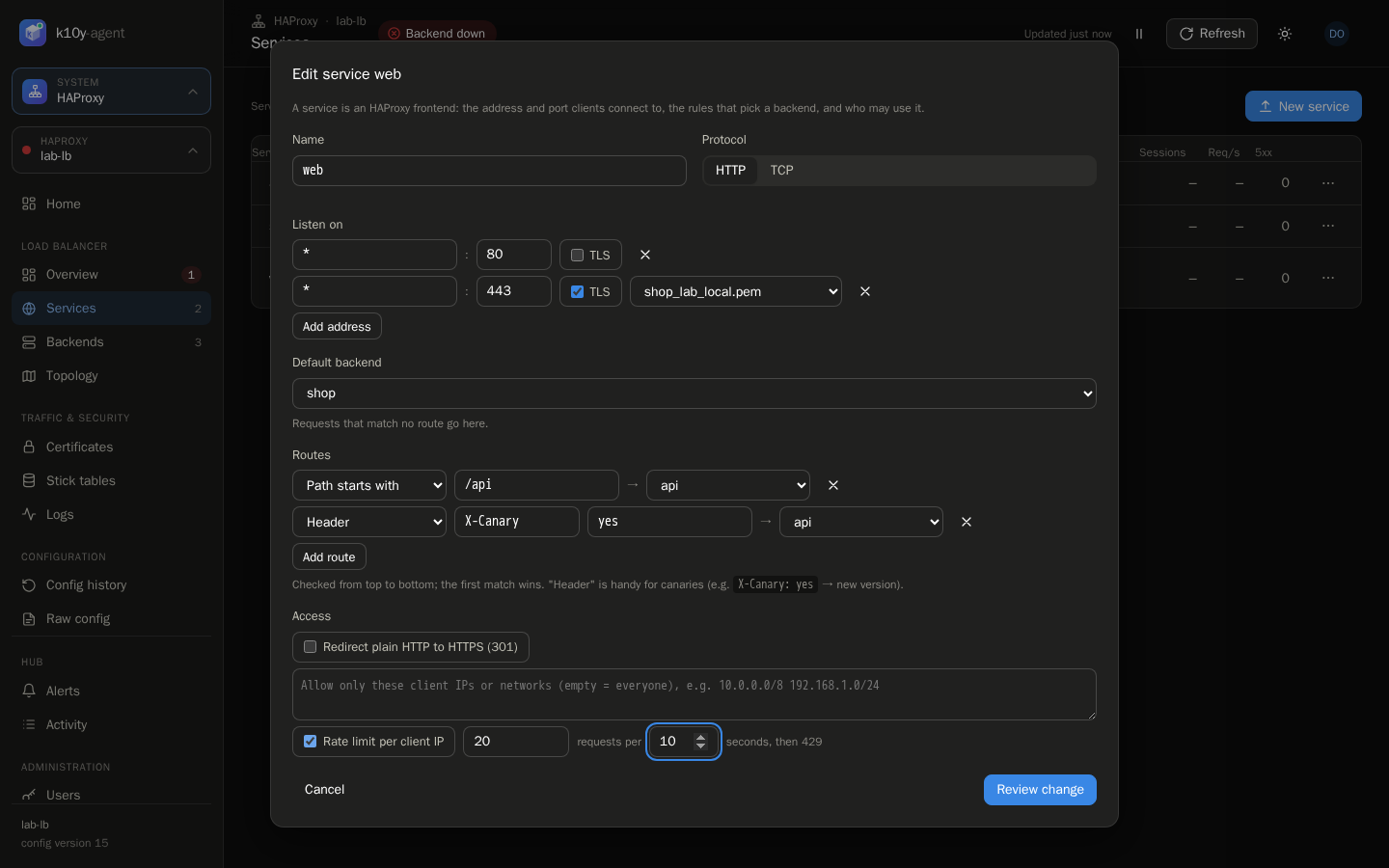
|---|---|
| TLS on a listen address | Serves HTTPS with a certificate from the Certificates page |
| Routes | Path starts with, path is, host is, header (e.g. X-Canary: yes → new version) and client IP in (networks) |
| Redirect HTTP to HTTPS | 301 redirect for plain HTTP requests |
| Allow only these client IPs | Everyone else gets 403 |
| Rate limit per client IP | N requests per S seconds, then 429. The tracked IPs show on Rate limits & blocks, where Unblock lets one in again. |
| Client idle timeout | How long a client may stay idle, e.g. 30 s for websites, 3600 s for WebSocket |
Maintenance page
⋯ → Maintenance page on a frontend answers every request with a simple "Back soon" page (HTTP 503) and your message, while the servers keep running. List your office or VPN addresses to still let them through for testing. ⋯ → Turn off maintenance page ends it. Frontends in maintenance show a Maintenance badge.
Block an IP and unblock a rate-limited client
- Block: on Rate limits & blocks → Blocked IPs, or Block next to a client on the Logs page. Connections from that address (or network, like
203.0.113.0/24) are refused on every frontend. The first block on an HAProxy adds the list to every frontend with one seamless reload; after that, blocking and unblocking are instant, without a reload, and the list is kept for future reloads. Frontends created later are protected too. - Unblock a rate-limited client: on Rate limits & blocks, Unblock resets that client's counters to 0, so the rate limit lets it in again right away.
Other request rules a frontend already has are kept untouched and listed as "custom rules".
Weight and canary releases
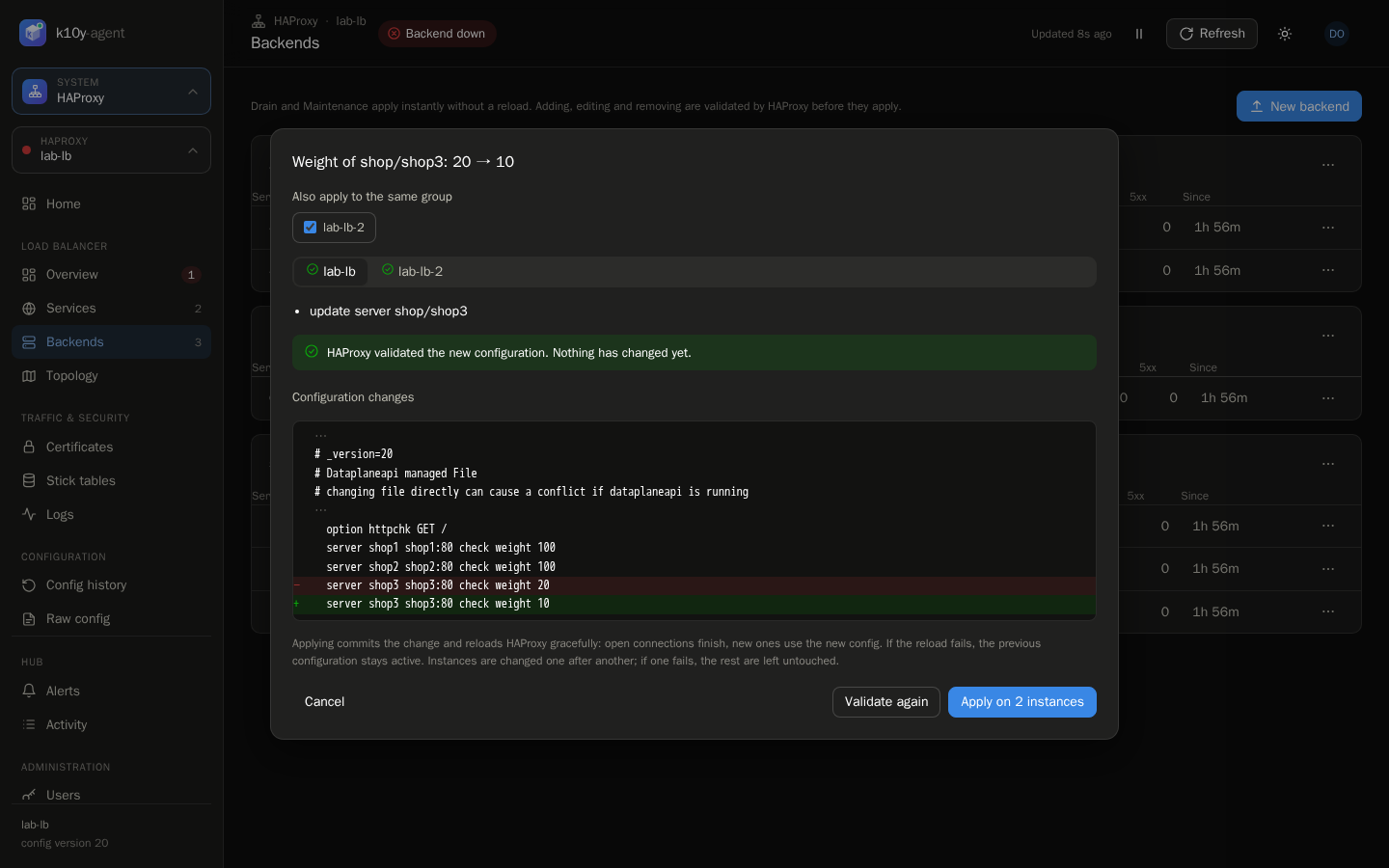
⋯ → Change weight on a server shows what share of the backend's traffic it will get (e.g. weight 10 next to two servers at 100 → about 5%). HAProxy's Data Plane API has no live weight setting, so this is a small config change with a seamless reload (about two seconds, open connections are not dropped). For a header-based canary, add a header route instead.
Rolling deploy
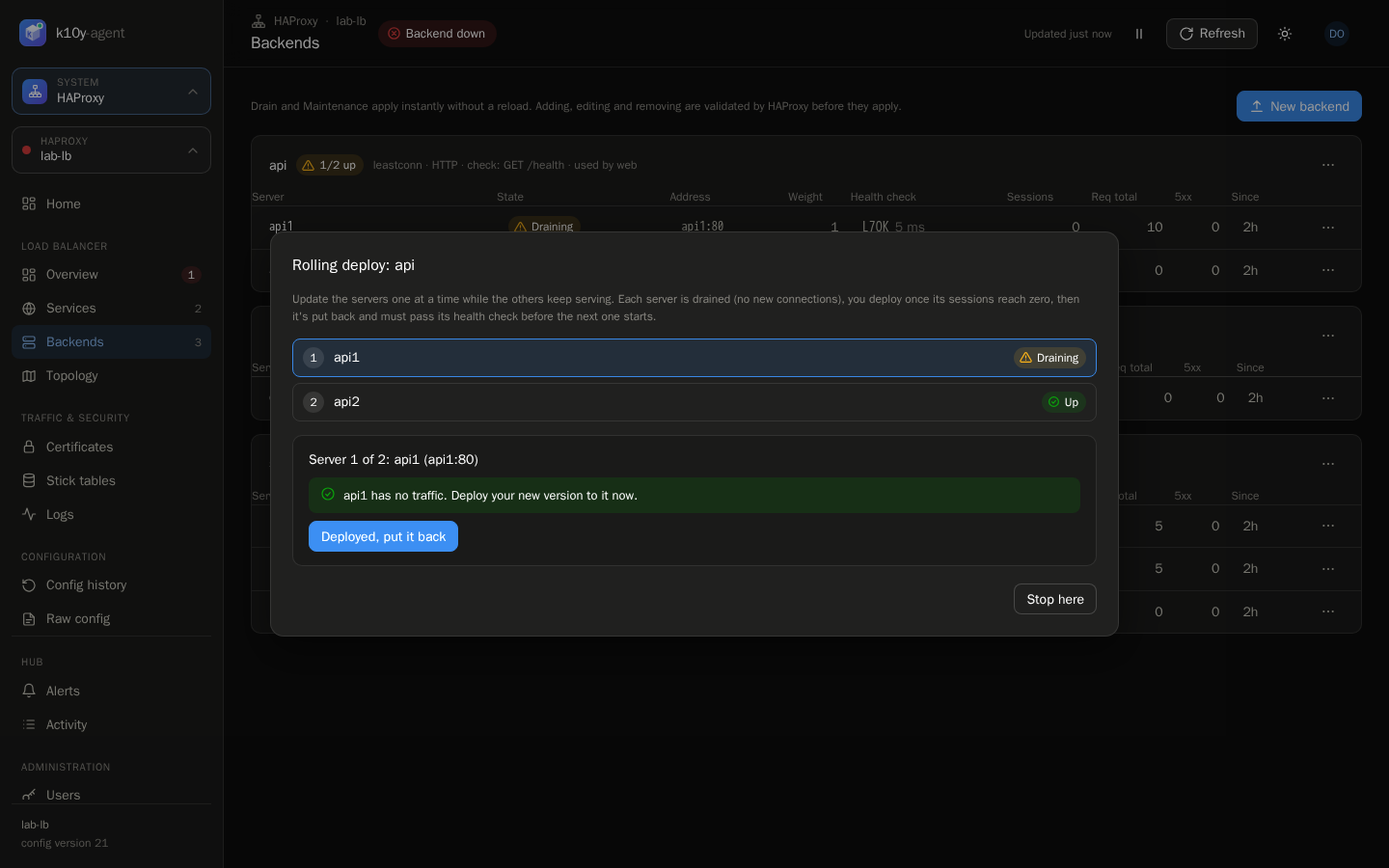
⋯ → Rolling deploy on a backend walks through its servers one at a time: drain → wait until its sessions reach zero → you deploy → put it back → wait for its health check → next server. It refuses to drain a server when no other server is up.
Groups (several HAProxy at once)
Give instances the same group (Administration → HAProxy instances), for example the two load balancers of an HA pair. Every change dialog then offers Also apply to the same group: you see the diff and validation for each instance, and Apply changes them one after another, stopping at the first failure.
Compare configs (on the Overview's status line) shows whether the others in the group have the same configuration, with the exact difference, and Make … the same copies this configuration to another member after a review. Each HAProxy keeps its own log-tag.
Kubernetes link
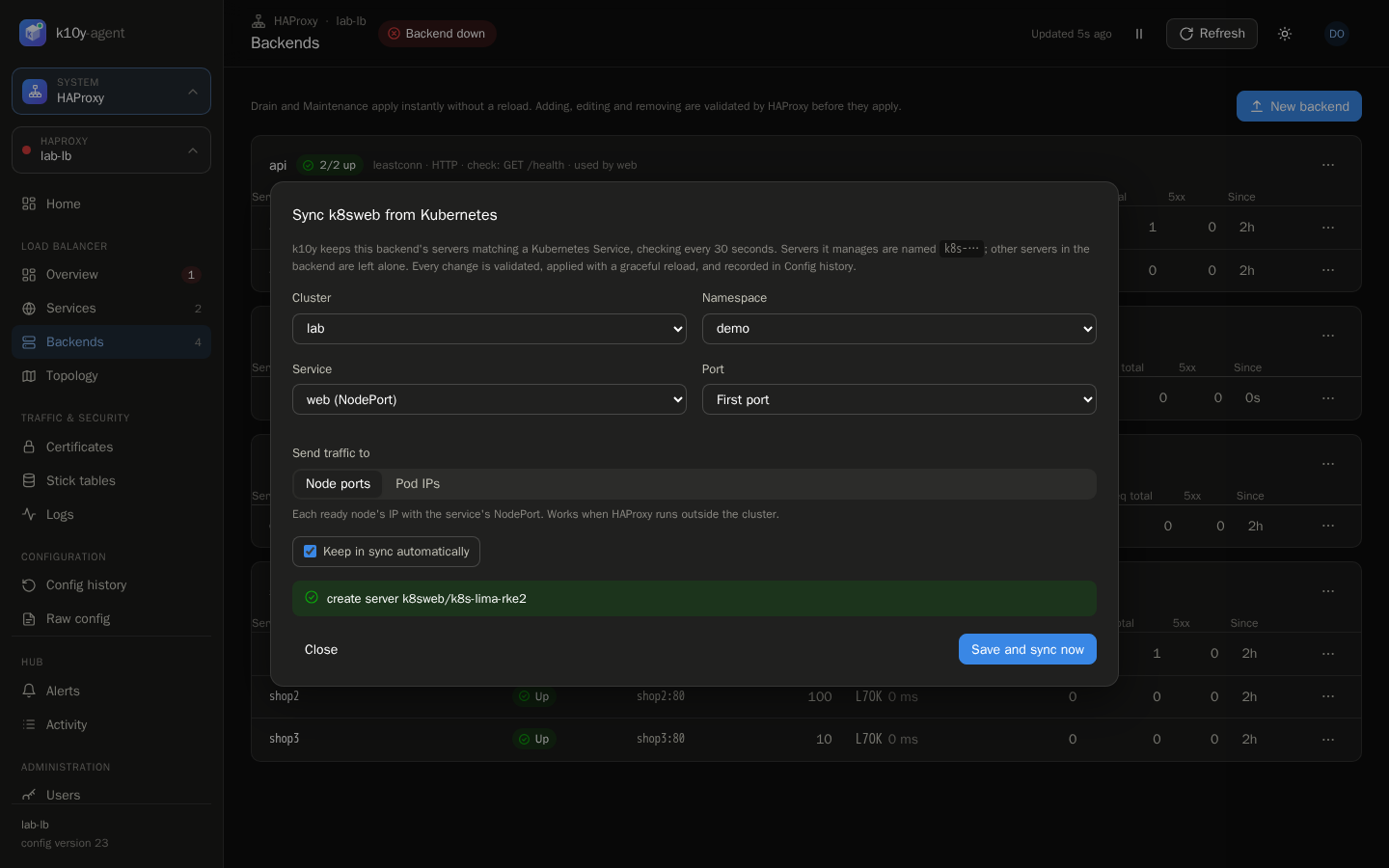
⋯ → Sync from Kubernetes on a backend keeps its servers matching a Kubernetes Service:
- Node ports: each ready node's IP with the Service's NodePort. Use this when HAProxy runs outside the cluster.
- Pod IPs: each ready pod's IP and target port. Use this when HAProxy can reach pod IPs.
k10y checks every 30 seconds and adds, updates or removes the servers it manages (named k8s-…); other servers in the backend are left alone. Every sync change is validated, applied gracefully and recorded in Config history as Kubernetes sync. You need haproxy.configure and cluster.view on that cluster.
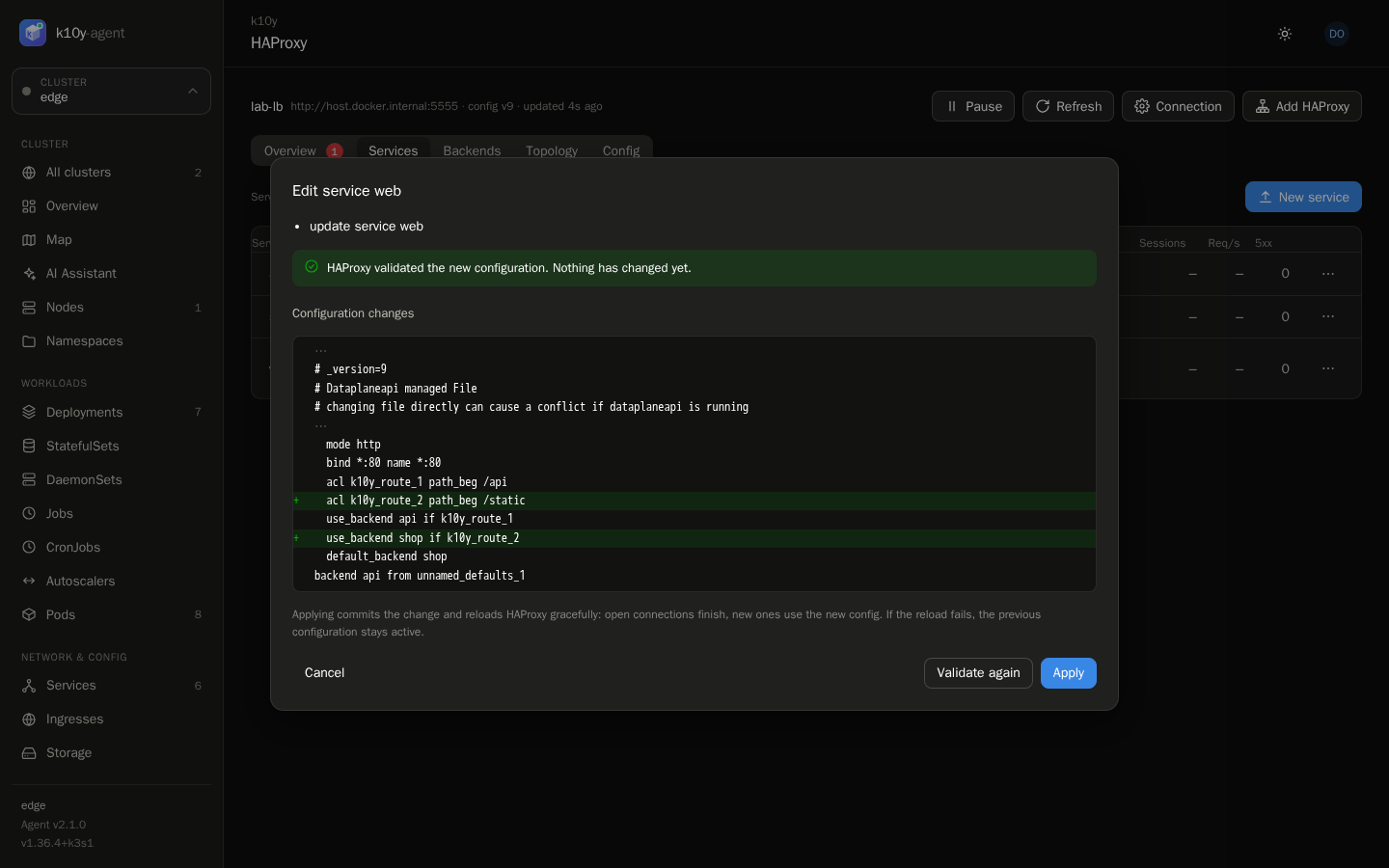
Every change goes through the same review:
- k10y prepares the change in a Data Plane API transaction. Nothing is live yet.
- You see exactly which lines of
haproxy.cfgchange, and HAProxy's own validation result. - Apply commits it. HAProxy reloads gracefully: open connections finish on the old process. k10y waits for the reload result. If the reload fails, the previous configuration stays active and you're told why.
Forms only change what you changed. Routing rules that are more complex than path or host matches are kept as they are, and can be edited on the Config tab.
Certificates
Certificates → Upload takes the certificate chain and private key as PEM (paste them, or choose the files). Replacing a certificate that's in use reloads HAProxy gracefully. A certificate still used by a frontend can't be deleted. The page shows each certificate's expiry; add an alert rule HAProxy → Certificate expiring to be warned in time.

Logs
HAProxy sends its logs to the hub over syslog (UDP port 5514 on the hub, set by K10Y_SYSLOG_PORT, published by the provided docker-compose.yml). The Logs page shows how to point HAProxy at the hub, and Add this to the config… adds the two lines through the normal review:
global
    log <hub-address>:5514 len 4096 local0
    log-tag <instance log tag>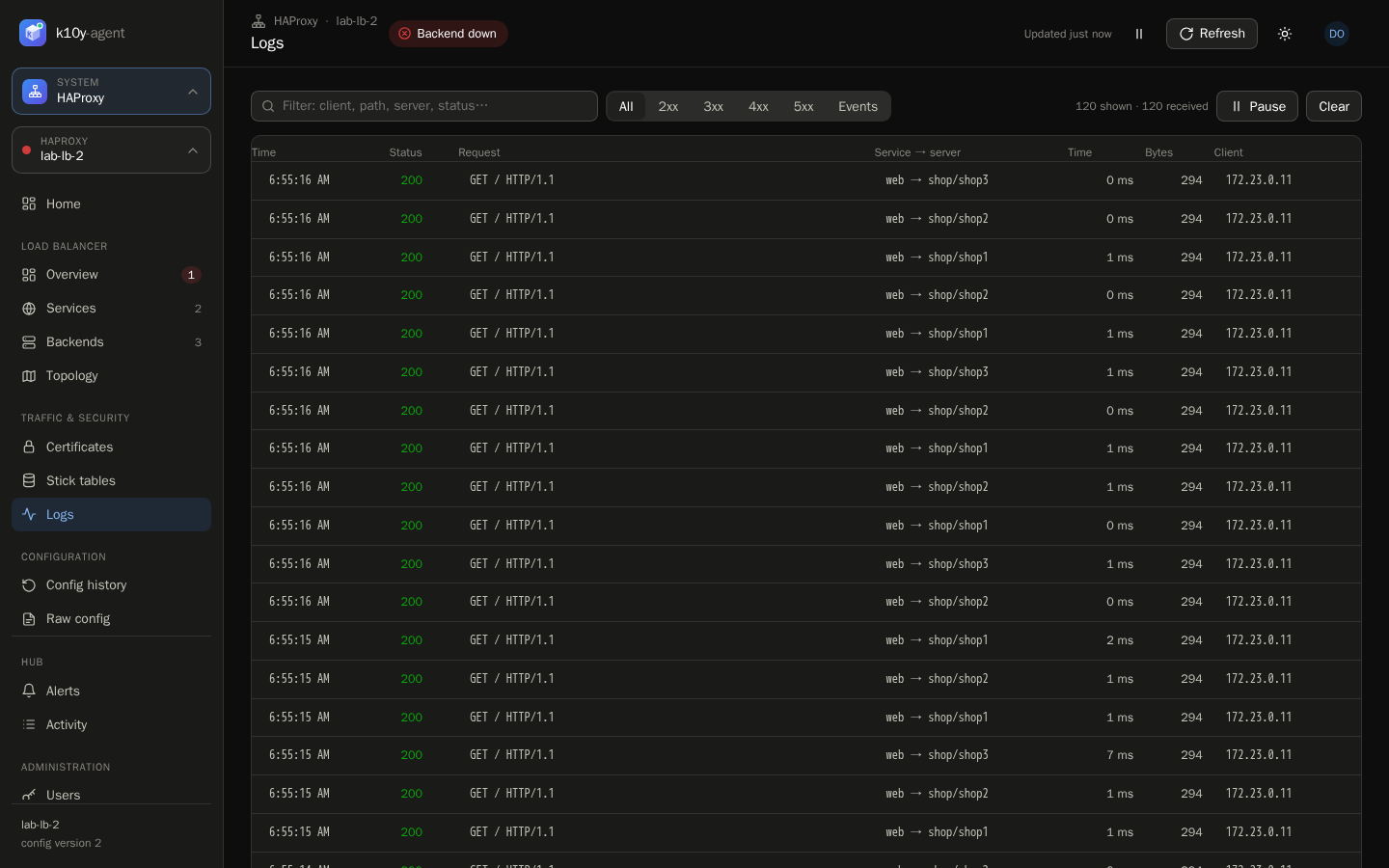
The hub keeps the last 3,000 lines per instance in memory.
Config history and rollback
k10y records a new version every time the configuration changes: applied from k10y (with the user), synced from Kubernetes, rolled back, or changed outside k10y (checked every 30 seconds). Select a version to see what changed, and Restore this version to roll back through the usual diff and validation.
AI assistant
AI Assistant (in the HAProxy sidebar), Ask AI on the Overview's problems, or ⋯ → Diagnose with AI on a frontend or backend. Choose the whole HAProxy, one frontend or one backend, and optionally ask a question ("why are users getting 503 on the shop?").
The AI investigates with read-only tools:
- server states and health-check results
- live rates
- recent request logs: status, termination state, which server answered
- config sections, with passwords removed
- certificates and recent config changes
You get a summary, the issues with their root cause and evidence, and proposed fixes: drain, maintenance or back in service, weight, server address or port, backend balancing or health check.
Nothing is applied automatically. Review & apply opens the normal flow: a confirmation for drain and maintenance, or the diff and HAProxy's validation for config changes. k10y refuses suggestions that would take a backend's last healthy server out of rotation, or that name a backend or server that doesn't exist. You need haproxy.view and ai.use; every investigation is in the audit log. The AI provider is the one configured in System settings, and the data the AI reads is sent to it.
Alerts
Alert rules of type HAProxy (Alerts → New rule):
| Condition | Fires when |
|---|---|
| A server is down | A server's health check fails |
| A backend has no server up | The frontend using it is failing |
| Server errors (5xx) above | More than N% of responses are 5xx (at ≥ 1 request/s) |
| Sessions near the limit | Current sessions reach N% of the frontend's limit |
| Certificate expiring | A certificate expires within N days |
| HAProxy unreachable | The hub can't reach the Data Plane API |
They notify through the same Telegram channels as cluster alerts.
Troubleshooting
| Message | What it means |
|---|---|
| cannot reach the Data Plane API … check Config history | The Data Plane API restarted in the middle of a change. Open Config history to see whether it was applied before trying again. |
| reached the maximum amount of 20 active transactions | Another tool (or an older crash) left transactions open. k10y closes its own and outdated ones automatically; delete the rest with DELETE /v3/services/haproxy/transactions/<id> on the Data Plane API. |
The Data Plane API (seen in v3.2.18) can crash when it receives two configuration changes at the same moment. k10y always sends them one at a time per HAProxy; if other tools change the same HAProxy too, run the Data Plane API with a restart policy (restart: unless-stopped).
Raw configuration
Config → Edit opens the whole haproxy.cfg for anything the forms don't cover, such as TLS certificates, ACLs, stick tables or global tuning. Review change shows the diff and the validation result before you apply. Reading the raw config needs haproxy.configure too, because it can contain passwords.
Permissions
| Permission | Allows |
|---|---|
haproxy.view | All HAProxy pages (except the raw config) |
haproxy.operate | Drain, maintenance, back in service |
haproxy.configure | Add, edit and remove frontends, backends and servers; read and edit the raw config |
clusters.manage | Connect, edit and remove HAProxy instances (Administration → HAProxy instances) |
These are global permissions: assign the role on all clusters. On new installs, Viewer includes haproxy.view and Operator includes haproxy.view and haproxy.operate.
Every runtime action, preview (as a dry run) and applied change is in the audit log.
Try it: the HAProxy test lab
The repository includes a Docker lab with two HAProxy 3.2 instances (to try groups), the Data Plane API, five demo web servers and one deliberately broken backend:
make haproxy-lab-up # prints the URL and the generated API password| Traffic | http://localhost:8088 (/ → shop, /api → api) |
| Broken frontend | http://localhost:8081 (backend legacy, always down) |
| Stats page | http://localhost:8404/stats |
| Data Plane API | http://localhost:5555/v3, user admin (second HAProxy: traffic :8098, API :5556) |
Connect it in k10y with the URL http://host.docker.internal:5555 (from a hub running in Docker on the same machine). make haproxy-lab-down stops it.